How to Mitigate Latency in Multiplayer Games: Input Delay vs Rollback
Latency (“lag”) in online multiplayer is quite simply, just a reality that game developers must consider when it comes to designing the gameplay and backend of their game to ensure a great gameplay experience for their players.
As such, game developers must consider how to mitigate latency. Historically, there has been two main techniques used: Rollback (i.e., client-side predictions), alongside Input Delay (input delay).
In this article, we’ll highlight what each technique does (and how it works).
For a deeper understanding of Rollback Netcode, our in-depth article is available here.
Why Latency (“Lag”) Happens in Multiplayer Games
Why would game developers even need to “mitigate” latency in the first place?
Whether it is in peer-to-peer (where the game server is hosted by one of the player), through relays or with the game server in the cloud (see a breakdown of each architecture) data must pass through a complex series of networks (i.e. “the internet”) to reach each player, and whenever new input is provided, it must be sent each way. That takes time, as there’s laws of physics limiting how fast that data can travel through cables/satellites and all the hardware in between.
Sometimes, it might be fast enough its seamless, e.g., playing with someone down the street.
Most times, it is not. A Call of Duty match may include dozens of players all acting in the game all of which needs to be reconciled, and all of these players are hundreds, if not thousands, of miles or kilometres away.
That’s where latency happens – there will be chokepoints, and it will impact your latency.
That’s why deploying servers closest to players is effective, but there’s more to being close to someone to reduce latency.
Mitigating Latency Technique: Input Delay (Lockstep)
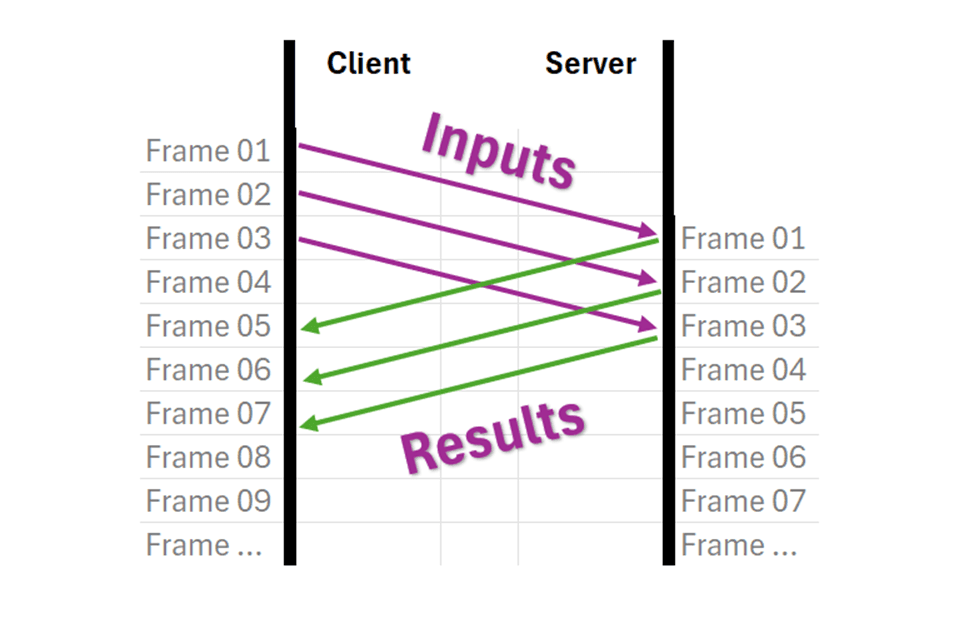
Input delay, often called the lockstep model, works by having clients send their button presses to a central server and then waiting to display anything until the server sends back the simulation results.
The major drawback is that players experience a noticeable delay between pressing a button and seeing the action happen on screen—this delay equals their round-trip time (ping) to the server, meaning a player with 100ms ping will wait a full tenth of a second before seeing their character respond.
The advantage of this approach is visual consistency: every player sees exactly what the server says is happening with no graphical glitches or disagreements between different players' screens.
This makes it suitable for real-time strategy games, certain sports games, and older fighting games, where it provides acceptable gameplay as long as players have relatively low ping (around 50ms or less).
Visually, it works a bit like this:
Mitigating Latency Technique: Rollback (Client-side Prediction)
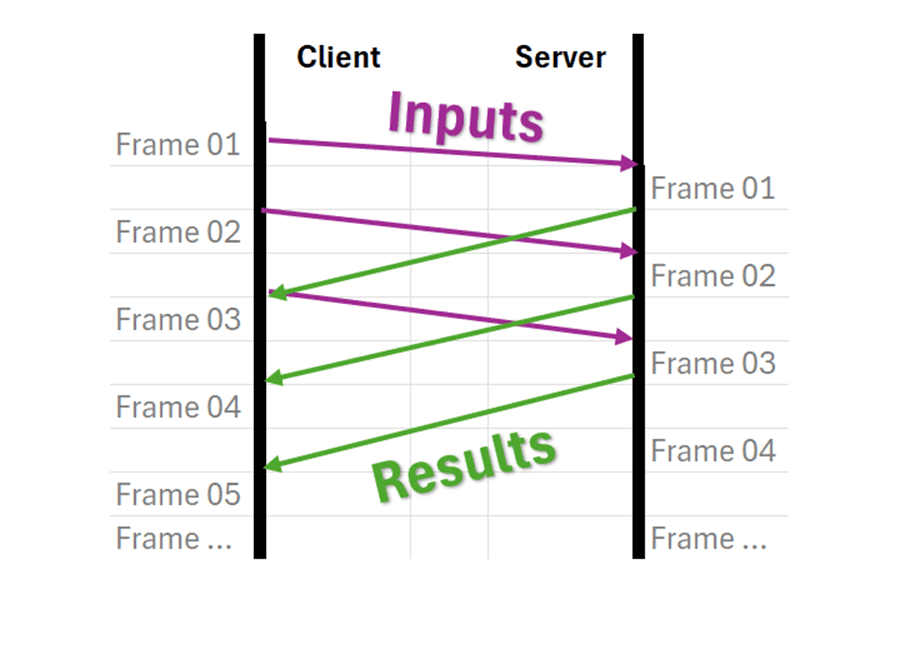
Client-side prediction, commonly known as rollback, attempts to eliminate input delay by having the client immediately simulate and displays the results of a player's actions without waiting for the server.
When the server's authoritative response eventually arrives (often several frames later), the client must perform "reconciliation"; i.e., it rolls back its simulation to the earlier frame, reapplies the server's correct results, and then resimulates all the frames in between to catch back up to the present.
The benefit is instant responsiveness: players see their actions happen immediately when they press a button, which is crucial for reaction-based games like shooters and fighting games.
However, the technique introduces visual glitches when the client's prediction doesn't match what the server says actually happened. Objects may suddenly teleport, appear, or disappear as the simulation corrects itself. Additionally, the constant resimulation of multiple frames creates significant CPU overhead.
Some games try to balance both approaches by adding a small, fixed input delay while using prediction to handle any additional latency, giving players responsive controls with fewer visual artifacts. Modern implementations can even dynamically adjust this input delay in real-time to find the optimal balance.
Visually, it looks a bit like this:
Suggestions & Considerations
Each game’s gameplay and infrastructure will impact how a multiplayer game developer
Certain netcodes might be excellent at predictions, which will help reconcile inputs. For example, Rivals of Aether 2 uses the SnapNet netcode in tandem with Edgegap’s orchestration which allows Aether Studios to deploy closest to users for the lowest latency possible for any match. Resulting is AAA online fighting game experience with a team of 10.
Others might prioritize the lowest bandwith possible to minimize Egress costs.
Understanding the tools at your disposal and what suits best your end-user experience is therefore key.
Of additional consideration is to fine-tune the balance between input delay and rollback through three key settings that act as soft constraints.
The minimum input delay setting controls the baseline delay applied regardless of latency (typically set to 0 for maximum responsiveness), though some fighting games use higher values to ensure consistent timing for precise inputs.
The maximum input delay setting determines how much delay will be added to cover latency before any prediction kicks in, with a common default of 50ms that provides an artifact-free experience for low-latency players while keeping controls feeling snappy.
However, be aware that traditional orchestration is unlikely to deliver a 50ms target. As such, a modern orchestrator which taps into a massive 615+ locations network like Edgegap’s helps you deliver exactly within this range.
The maximum predicted time setting caps how far ahead the client can simulate to compensate for latency, typically defaulted to 100ms to cover most network conditions while minimizing visual glitches. Combined with 50ms of maximum input delay, this means players with 50-150ms ping experience minimal delay and only occasional artifacts. An achievable target for most players with well-distributed servers. Players under 50ms ping get the cleanest experience with pure input delay, while those between 50-150ms get a responsive feel with rollback handling the difference.
For players exceeding these thresholds, additional latency translates into more input delay rather than more prediction, causing controls to feel increasingly sluggish but keeping the game playable. This approach is generally preferable to extended prediction over long time horizons, which can create erratic, disorienting visual corrections that make the game feel broken rather than just delayed.
The Uncontrollable Issue: The Network
As research shows, the majority of latency is introduced by the network itself – 31%, when excluding normal human eye/response. Magnitudes over server or player hardware or the game code itself, double that of their total (14%).
Thus, only modern game server orchestration in combination with the ability to leverage a large edge infrastructure, like those provided by Edgegap, can tackle this specific element challenge.
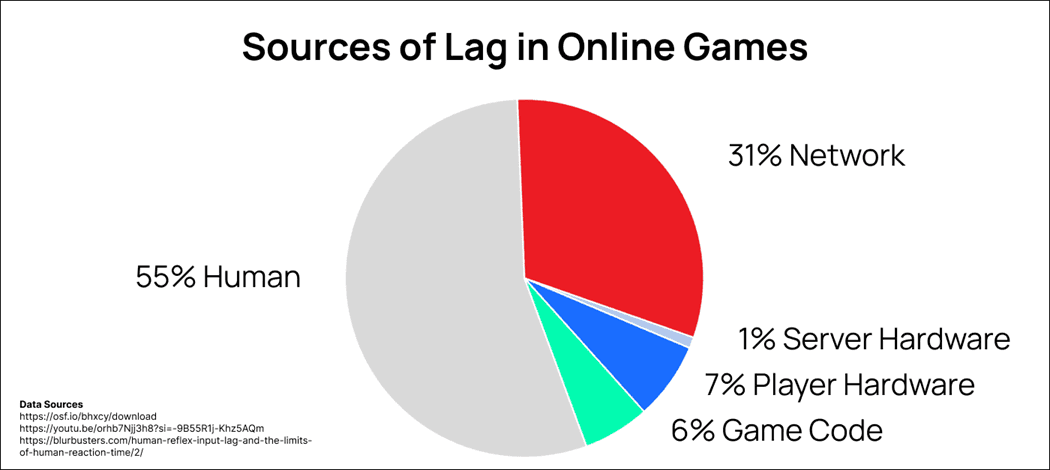
Which provides game developers with the ability to instantly enhance play experience with reduced latency (58% reduction on average), and thus reduces the complexity associated with integrating latency mitigation system such as rollback netcode as the thresholds and averages are more consistent for all players.
The Solution: Netcode Adapted to your Needs + Edgegap’s Orchestration
The key to exceptional online multiplayer isn't choosing between input delay and rollback—it's implementing netcode tailored to your game's specific needs and ensuring players connect with minimal latency. A well-configured networking system can provide responsive, artifact-free gameplay, but only if players can consistently achieve low ping to your servers. This is where modern orchestration becomes critical.
Edgegap's infrastructure leverages 615+ locations worldwide to deploy game servers on-demand closest to your players, dramatically reducing the latency for everyone in a match. By minimizing round-trip times, more players fall into that ideal sub-50ms range where input delay alone can provide a smooth, glitch-free experience, or the 50-100ms sweet spot where minimal prediction maintains responsiveness without noticeable artifacts. Rather than forcing your netcode to compensate for poor server placement, Edgegap ensures your carefully tuned networking model performs exactly as intended—delivering the ideal game experience, every time.
Another Consideration: Matchmaking
While out of the scope of this article, is the importance of matchmaking.
Effective matchmaking plays a crucial role in optimizing latency by grouping players who are geographically close to each other and to available server locations.
Even with 615+ edge locations at your disposal, a match that pairs players from vastly different regions will force some participants into high-latency situations, undermining both your netcode's effectiveness and orchestrator’s network deployments.
Smart matchmaking algorithms should consider both skill-based criteria and geographic proximity, ensuring that when a server is deployed, all players in that match can connect with similar, low ping values. This balanced approach prevents scenarios where one player enjoys a sub-50ms artifact-free experience while another struggles with 200ms+ latency and sluggish controls—creating fair, competitive matches where your networking techniques can perform at their best for everyone involved.
Fortunately, Edgegap’s matchmaking is available, and includes latency-based rules which helps you solve this challenge.
Written by
the Edgegap Team