The Real Cost of AWS GameLift at Global Scale
The Real Cost of AWS GameLift at Global Scale
Estimating cloud costs for game server hosting is a complex task for multiplayer game developers. Public cloud pricing models can make it difficult to anticipate the full cost of global deployment.
Editor's note (April 2026): This article was originally published in November 2024. Since then, AWS GameLift has reached general availability for container fleets, introduced scale-to-zero autoscaling, and reduced on-demand pricing by up to 9% across 22 regions. The specific cost figures below reflect a scenario modeled at time of publication. We recommend re-running the AWS GameLift pricing calculator for current estimates. The regional pricing structure and multi-region cost gap described here remain accurate as of this update.
Amazon provides a tool to build an estimate, based on a few inputs: which region you want to use, peak concurrent players, how many players per session (i.e. match), how many matches per server, server size, idle buffer (how much unused capacity you expect), percentage of spot instances (those lower-cost VMs which can be turned off at any time), and how much bandwidth each player needs.
US East Ohio is arguably one of the cheapest and largest regions. Filling in the information, the estimated price comes to $1,330 per month. Which seems reasonable, right? For a commercial release targeting global players, a title typically requires 6 to 10 regions to ensure a quality experience.
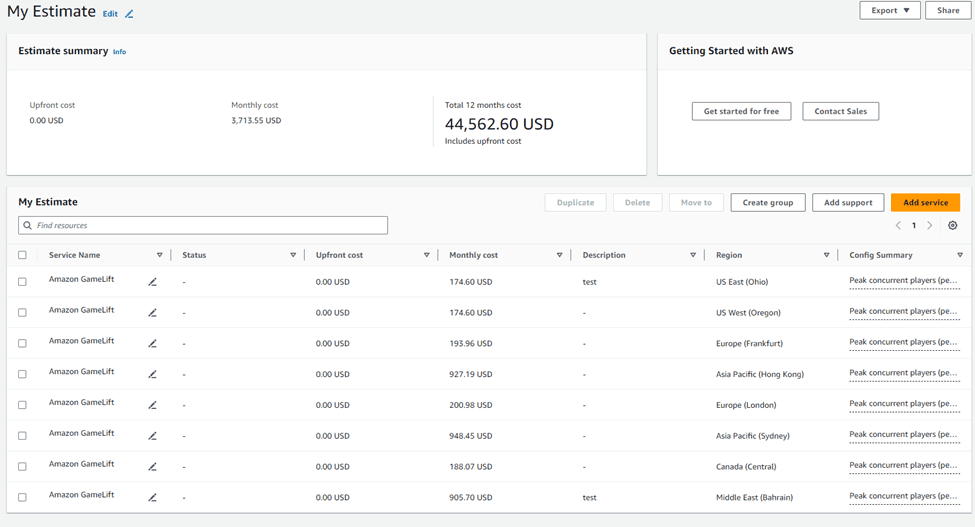
Updating the form, what was initially a $1,330 budget ended up being a $3,713 monthly cost: a 279% increase.
These figures reflect a scenario modeled in November 2024 using the AWS GameLift pricing calculator, and on-demand rates have shifted modestly since. Cloud infrastructure bills can grow quickly across line items, and the regional gap illustrated here is one of the less obvious contributors. We built the Edgegap Pricing Calculator specifically to give studios a clearer, more transparent picture of what game server hosting and orchestration actually costs before they commit.
Let's understand why.
How Much Is AWS GameLift?
AWS GameLift pricing varies based on region, instance type, and usage. The pricing calculator considers factors such as:
Region selection (e.g., US East Ohio, London, Hong Kong)
Peak concurrent players
Players per session
Matches per server
Server size
Idle buffer
Spot instance percentage
Bandwidth per player
Using the pricing calculator, estimates can range from hundreds to thousands of dollars per month, depending on the scenario.
US East Ohio is AWS's largest region and one of the most budget-friendly. What's often overlooked is that each AWS region has its own pricing model, a detail that matters significantly when estimating costs at scale.
Using a typical studio scenario, the numbers arrive at an estimated monthly cost of $1,330. But for a global commercial release, it would require 6 to 10 regions to ensure a seamless gaming experience.
A natural assumption is to divide the Ohio region cost across 8 locations, but re-running the numbers reveals the answer is more complex.
Distributing the Ohio region's traffic across 8 strategic locations worldwide (two in the US, Canada, London, Frankfurt, Hong Kong, Bahrain, and Sydney) results in a 279% increase, bringing the estimated monthly cost to $3,713.
This comparison illustrates how AWS GameLift's pricing calculator defaults to a single-region view, which can lead studios to significantly underestimate global deployment costs.
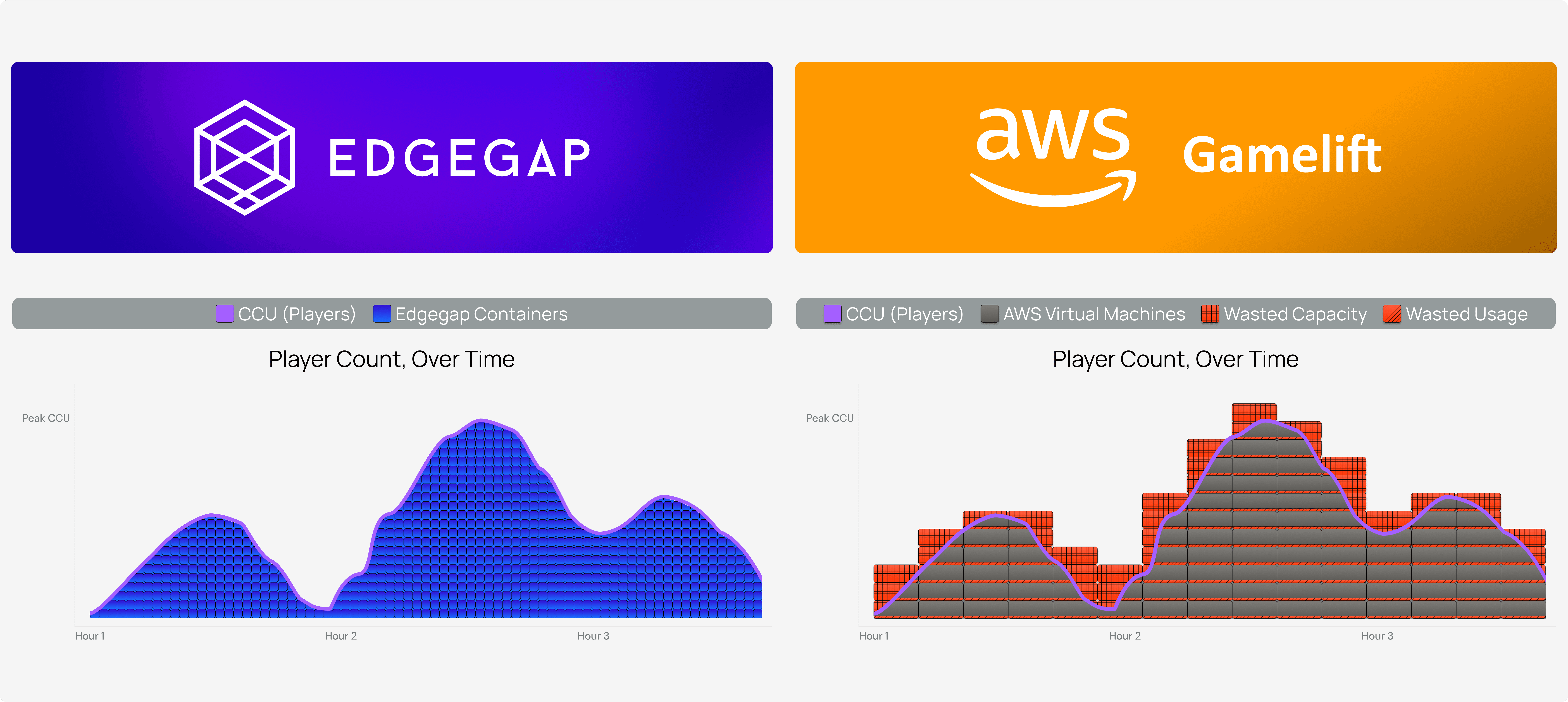
That is where Edgegap's orchestration model differs: it allows developers to deploy their game servers across 615+ locations worldwide (as of writing), paying only when players are active in those locations. Studios comparing total hosting costs across configurations can use the Edgegap Pricing Calculator to model their own scenario.
How Does AWS GameLift Work?
AWS GameLift provides a suite of tools and features to support game development, including:
AWS GameLift SDK: Integrates with popular game engines like Unreal Engine and Unity.
AWS GameLift CLI: Allows developers to manage game servers and fleets from the command line.
AWS GameLift API: Provides programmatic access to GameLift features.
Game Server Management: Automates game server deployment, scaling, and management.
AWS CloudFormation for GameLift: Automates infrastructure deployment and management.
Reserved Instances: Provides discounted pricing for committed usage.
Spot Instances: Offers lower-cost, flexible instances for non-critical workloads.
GameLift supports deployment in multiple AWS regions for players worldwide.
Why Use AWS GameLift?
AWS GameLift offers the benefits of managed orchestration, including:
Scalability: Automatically scales game servers to meet player demand.
Performance: Optimizes game performance with low-latency and high-throughput servers.
Cost options: Provides pricing models including spot instances and reserved instances.
Security: Ensures secure game server deployment and management.
Integration: Supports popular game engines and integrates with other AWS services.
How Does AWS GameLift Orchestration Compare to Container-Based Solutions?
For studios prioritizing flexibility, scalability, and lower DevOps overhead, container-based orchestration is generally the stronger fit, for the reasons outlined below.
AWS GameLift added container support in 2024, with general availability reached in early 2025. The container fleet feature closes some of the gap with purpose-built container platforms, though meaningful differences remain.
Here are the key considerations for game studios evaluating AWS GameLift against container-based orchestration:
While AWS GameLift offers streamlined game server management, its orchestration capabilities differ from container-based solutions. Container instances, such as Kubernetes, provide greater flexibility, scalability, and control.
GameLift's proprietary orchestration model offers less flexibility for customization compared to container-based solutions, which allow developers to define their own orchestration logic, leverage existing containerized applications, and integrate with a broader ecosystem of tools and services.
For developers seeking fine-grained control over their game server infrastructure, container instances are likely a better fit.
For more information on the benefits of container-based orchestration, read JungHun Kim (DevOps Team Lead at KRAFTON) on the migration of PUBG: Battlegrounds from EC2-based servers to container-based orchestration (as presented at AWS re:Invent 2024).
Written by
Mathieu Duperré