Bases du netcode - Ping, tickrate et modèles réseau expliqués

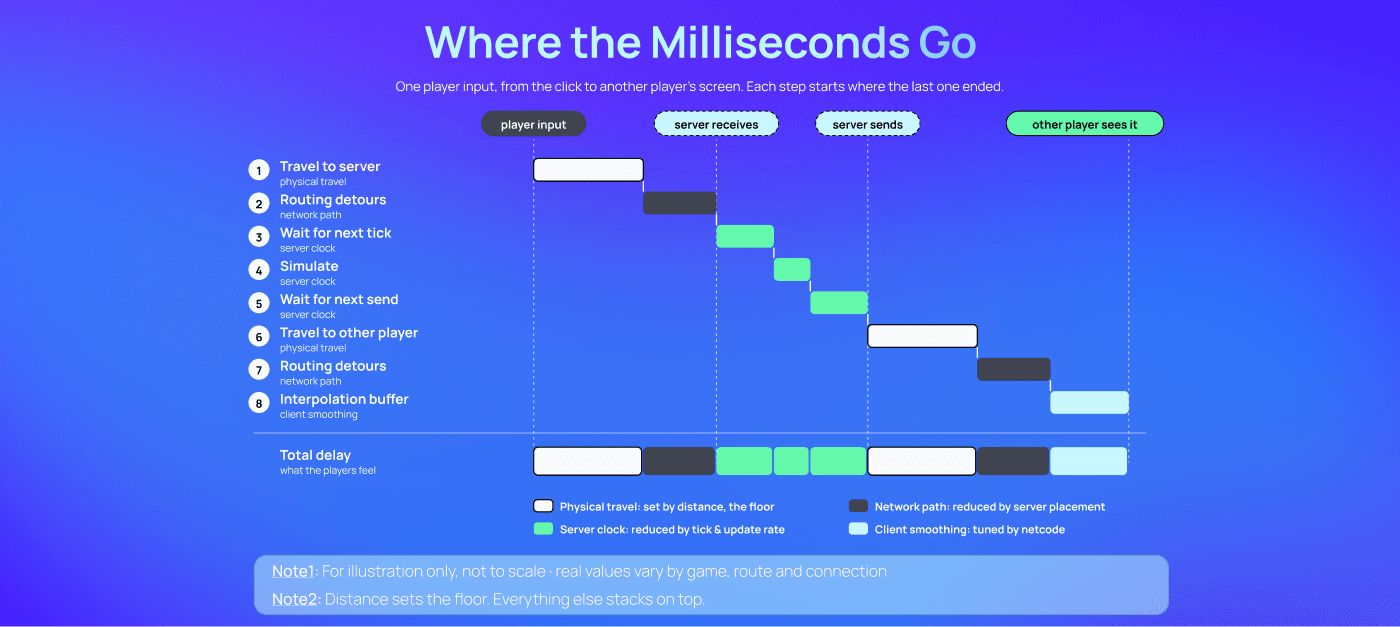
La latence a un plancher incompressible, et tout le reste s'y ajoute : Le temps de trajet physique entre deux machines est le délai minimal que tout jeu en ligne peut avoir. Le routage, le tickrate, le taux de rafraîchissement et le traitement s'y ajoutent tous. Le netcode ne peut pas supprimer ce délai. Il peut seulement décider où les joueurs le ressentent.
Le chemin le plus court est rarement le plus rapide : Une connexion directe en peer-to-peer semble être le trajet le plus court entre deux joueurs, mais les paquets traversent quand même les FAI des deux joueurs et les itinéraires que ces réseaux choisissent. Un serveur bien placé entre eux est souvent à la fois plus rapide et plus équitable.
La compensation de lag déplace le coût, elle ne l'efface pas : La compensation de lag rembobine le serveur pour que le tir d'un joueur à fort ping soit pris en compte, ce qui signifie que la cible peut être touchée après s'être mise à couvert. La seule vraie solution consiste à maintenir de faibles écarts de ping, ce qui en fait autant un problème de matchmaking et de placement de serveur que de netcode.
Le tickrate est un budget temps : Le tickrate d'un serveur définit le nombre de millisecondes dont il dispose pour simuler chaque étape du jeu. Des fréquences plus élevées réduisent le délai et améliorent la détection des tirs, mais consomment plus de CPU et de bande passante. Un serveur qui dépasse son budget saccade pour tout le monde dans la partie.
Deux choix distincts, et non un seul : L'endroit où le jeu s'exécute (peer-to-peer, relais ou serveur dédié) et la manière dont l'état est partagé (lockstep, rollback ou réplication d'état) sont des décisions indépendantes. N'importe quel modèle de synchronisation peut fonctionner sur n'importe quel modèle d'hébergement.
Voici une introduction aux éléments fondamentaux du netcode pour le multijoueur en ligne. Tout au long de l'article, nous avons lié des définitions de glossaire pour chaque terme, ainsi que des articles d'analyse approfondie (Backend Deep Dive) qui montrent comment chaque concept a été appliqué dans des jeux multijoueurs célèbres.
Qu'est-ce que le netcode ?
Le netcode désigne le code réseau qui maintient la cohérence d'une partie multijoueur entre des machines distantes de quelques millisecondes. Il ne fonctionne pas seul. Le netcode est une couche d'un écosystème plus large, aux côtés de l'hébergement de serveurs, de l'orchestration et du matchmaking, qui ensemble offrent une expérience multijoueur en ligne. Notre article sur le netcode de Call of Duty montre comment ces couches interagissent dans un jeu en direct.
Le netcode lui-même se divise en sept parties :
Transport : le protocole qui transporte les paquets, presque toujours UDP pour les jeux en temps réel.
Boucle de simulation : la fréquence à laquelle le serveur fait avancer le monde du jeu (le tick rate).
Réplication : quelles données sont envoyées à chaque joueur, et à quelle fréquence (l'update rate).
Autorité : quelle machine a le dernier mot sur ce qui s'est passé, généralement un serveur faisant autorité.
Modèle d'hébergement : l'endroit où tourne la simulation faisant autorité, que ce soit sur la machine d'un joueur (peer-to-peer), derrière un relais ou sur un serveur dédié.
Modèle de synchronisation : la manière dont les machines restent d'accord, via le lockstep, le rollback ou la réplication d'état.
Dissimulation de la latence : la prédiction côté client, la réconciliation serveur, l'interpolation d'entités et la compensation du lag, les techniques qui rendent le délai invisible pour les joueurs.
D'où vient le netcode Client/Serveur
La plupart des jeux de tir modernes tirent leur netcode d'un seul jeu. Le Quake original (1996) utilisait un modèle pur client/serveur : les clients envoyaient leurs entrées au serveur, puis attendaient que le serveur leur dise ce qui s'était passé. Chaque client était un terminal affichant le monde du serveur.
Sur un réseau local, cela fonctionnait. Sur Internet, non.
John Carmack, alors programmeur principal chez id Software, écrivait dans son journal de développement d'août 1996 qu'il « travaillait avec de mauvaises hypothèses de base pour faire un bon jeu sur Internet ». Le modèle initial « visait des latences de connexion de < 200 ms », alors que les joueurs sur modem rencontraient « au minimum des latences de plus de 300 ms ». Avec un système pur client/serveur, chaque pression de touche attendait un aller-retour complet avant que quoi que ce soit ne bouge à l'écran.
Son correctif pour QuakeWorld a établi le modèle encore utilisé aujourd'hui. Le client allait désormais « deviner les résultats du mouvement de l'utilisateur jusqu'à ce que la réponse faisant autorité du serveur arrive ». Le serveur restait décisionnaire. Le client prédisait.
En termes de modèle de synchronisation (détaillé ci-dessous), QuakeWorld utilisait la réplication d'état : le serveur envoie l'état du monde, et chaque client prédit son propre mouvement jusqu'à l'arrivée de la mise à jour suivante. Ce n'est pas du lockstep, où chaque machine attend les entrées de toutes les autres avant de progresser.
Cette association, un serveur faisant autorité plus la prédiction côté client, est devenue la base sur laquelle d'autres ont construit. TRIBES (1998) a ajouté des ticks synchronisés de 32 ms, l'interpolation des autres joueurs et des entrées envoyées sur trois paquets consécutifs. Vingt ans plus tard, Overwatch utilisait toujours une fenêtre glissante d'entrées que ses développeurs attribuaient à QuakeWorld.
Qu'est-ce que le ping, et en quoi est-il différent du lag ?
Le ping est une mesure. Votre machine envoie un court message à une autre machine, qui y répond, et le temps écoulé entre l'envoi et la réception est le temps d'aller-retour (RTT). Pour une introduction accessible aux débutants, consultez le guide d'Edgegap sur ce qu'est la latence dans le jeu vidéo.
Le lag est la conséquence. C'est l'écart entre ce que vous voyez sur votre écran et ce que le serveur, ainsi que tous les autres joueurs, voient sur le leur.
Le lag est aussi plus qu'un simple ressenti. Dans le rapport sur la latence d'Edgegap, 50 % des joueurs ont désigné le lag comme leur première source de frustration dans les jeux en ligne, et 34 % ont déclaré avoir complètement abandonné un jeu à cause de cela.
Il existe une limite physique qu'aucun netcode ne peut franchir. Les données circulent à travers le cuivre et la fibre à une vitesse finie, de sorte que le lag ne peut jamais être inférieur au temps de trajet entre deux machines. Tout le reste vient s'ajouter à cette limite de base.
Le principal ajout est généralement le routage. Les paquets ne voyagent jamais en ligne droite. Ils passent par une chaîne de routeurs appartenant à différents réseaux, et chaque étape (hop) ajoute du temps. C'est pourquoi une infrastructure cloud distribuée commence par l'emplacement physique du serveur.
C'est également là que l'intuition nous trompe. Dans un match à deux joueurs, une connexion peer-to-peer directe semble être le chemin le plus court possible. Pas de serveur intermédiaire, juste un joueur relié à l'autre.
En pratique, « direct » signifie tout de même quitter le réseau domestique d'un joueur, traverser son fournisseur d'accès (FAI), traverser le FAI de l'autre joueur et arriver sur une connexion résidentielle qui peut être en Wi-Fi. Ajoutez d'autres joueurs et l'un d'eux doit héberger la partie, ce qui donne un délai de zéro à l'hôte et un délai différent pour tous les autres. Un serveur neutre bien placé entre tous les joueurs élimine l'avantage de l'hôte et raccourcit souvent le trajet réel. La section suivante explique pourquoi.
Pourquoi la distance seule ne permet-elle pas de prédire le ping ?
Deux joueurs éloignés de seulement 50 km peuvent tout de même avoir une mauvaise connexion entre eux. Ce qui importe, c'est le trajet que leurs paquets empruntent réellement.
L'équipe d'ingénierie de Riot Games l'a documenté en 2015 lors de la création de son propre réseau de jeu. Les fournisseurs d'infrastructures réseau et les FAI, expliquaient-ils, « privilégient un itinéraire moins cher plutôt qu'un itinéraire plus rapide ». Sur une connexion reliant San Francisco à Portland, « un trajet direct aurait pu prendre 14 ms, mais l'itinéraire moins efficace prend pas moins de 70 ms ».
La distance fixe la limite minimale. Le routage détermine à quelle hauteur au-dessus vous vous situez.
La même logique s'applique au choix de l'emplacement d'un serveur. Être proche d'un seul joueur n'est pas l'objectif. Le but est de trouver l'endroit qui offre à chaque joueur de la partie la meilleure connexion, et la plus équitable.
L'étude de cas d'Edgegap sur un jeu de combat en 1v1 avec un éditeur du top 5 a permis de mesurer cela. En déployant le serveur de chaque match à la demande à l'emplacement optimal disponible, plutôt qu'en utilisant un ensemble fixe de régions cloud publiques, l'écart de latence entre les adversaires est passé de 46,5 ms à 33 ms, soit une amélioration de 28 % de l'équité. 91 % des joueurs ont bénéficié d'une latence plus faible.
C'est la raison d'être de la multiplication du nombre d'emplacements : plus il y a d'endroits où un serveur peut démarrer, plus il est probable de s'appuyer sur un itinéraire court et équilibré pour tout le monde. C'est pourquoi le réseau d'Edgegap s'étend désormais sur plus de 615 emplacements dans le monde.
Pourquoi un seul joueur ayant un ping élevé affecte-t-il tout le monde ?
Dans un jeu de tir, un joueur avec un ping élevé vise là où il a vu la cible, c'est-à-dire déjà dans le passé. Si le serveur ne vérifiait les tirs que par rapport au présent, ce joueur ne réussirait presque jamais un tir.
La compensation de lag résout ce problème en effectuant un retour rapide en arrière. Lorsqu'un tir arrive, le serveur ramène tous les autres joueurs à l'endroit où ils se trouvaient lorsque le tireur a fait feu, puis y vérifie l'impact.
Cela fonctionne, mais cela a un coût. Yahn Bernier, alors développeur chez Valve, l'a décrit dans son document de 2001 sur la compensation du lag : lorsqu'un « joueur ayant beaucoup de lag tire sur un joueur qui en a moins et l'atteint, il peut sembler au joueur qui a le moins de lag que le joueur ralenti a d'une certaine manière "tiré à travers un mur" ».
Le joueur à faible ping s'est mis à l'abri sur son écran. Le serveur, revenu en arrière, décrète que non.
Les studios gèrent ce compromis différemment. APEX Legends répartit délibérément cette « aberration » de manière égale entre les joueurs à ping élevé et faible, acceptant que des joueurs à 300 ms puissent être touchés derrière un abri. VALORANT a estimé à environ 141 ms l'avance des joueurs qui surgissent au coin d'un mur (peeking), et a conçu son tick rate, son buffering et son routage pour réduire cet écart. Les deux approches se traduisent par de la désynchronisation et du rubberbanding lorsque les écarts deviennent trop importants.
Aucun paramètre de compensation de lag ne peut corriger un écart de ping trop important. C'est en maintenant cet écart le plus faible possible que l'on y parvient, c'est pourquoi la latence doit être prise en compte dans le matchmaking. Le matchmaker d'Edgegap intègre des règles de latence à cet effet, et notre guide sur l'amélioration de la latence par le matchmaking détaille cette approche, tout comme notre sujet sur l'équité face à la latence dans l'e-sport.
Qu'est-ce que le tick rate et l'update rate ?
Deux horloges tournent sur chaque serveur de jeu, et elles sont souvent confondues.
Le Tick rate (ou taux de simulation) correspond au nombre de fois par seconde où le serveur traite les entrées et fait avancer le monde du jeu.
L'Update rate (ou taux d'envoi) correspond au nombre de fois par seconde où le serveur envoie les résultats aux clients.
Ils sont souvent identiques, mais de nombreux moteurs de jeu les séparent.
Chaque tick représente un budget de temps fixe. La conversion est simple : divisez 1 000 par la fréquence en hertz.
Tick rate | Temps par tick | Exemple |
|---|---|---|
20 Hz | 50 ms | |
~31 Hz | 32 ms | |
60 Hz | 16,67 ms | |
64 Hz | 15,625 ms | |
128 Hz | 7,8125 ms |
L'intervalle de tick ajoute un délai en plus de la latence réseau. En moyenne, une entrée attend environ un demi-tick avant d'être traitée par le serveur, de sorte que passer de 64 Hz à 128 Hz réduit cette attente d'environ 7,8 ms à 3,9 ms.
Un serveur qui ne parvient pas à terminer son travail dans la limite de ce budget prend du retard. Dans APEX Legends, un serveur qui rate sa fenêtre de 50 ms fait saccader l'ensemble de la partie le temps que la physique, l'animation et la réplication rattrapent leur retard. Les joueurs subissent alors du rubberbanding, des téléportations et des tirs non enregistrés.
Des taux de rafraîchissement d'envoi faibles provoquent un phénomène encore plus curieux. Chris, l'analyste indépendant derrière la chaîne YouTube Battle(non)sense, a expliqué le phénomène de la « super balle » (super bullet) dans sa vidéo « Netcode 101 » en 2017. À 10 mises à jour par seconde, 100 ms séparent chaque paquet, soit le même écart qu'entre deux balles tirées par une arme à une cadence de 600 coups par minute. Une arme tirant à 750 coups/min ou plus regroupera deux balles ou plus dans une seule mise à jour, de sorte que la victime subira ce qui ressemble à un seul impact infligeant plus de dégâts qu'une seule balle ne le devrait.
Des tick rates plus élevés réduisent les délais et améliorent la détection des tirs. Ils consomment également plus de CPU par partie et, si le taux d'envoi augmente avec eux, plus de bande passante. Pour une analyse complète de ce compromis, voir l'article Le Tick Rate des serveurs de jeu expliqué.
Où tourne le jeu ? Les modèles d'hébergement
Le premier choix structurel concerne l'endroit où réside la simulation faisant autorité. Il existe trois grandes options.
Le Peer-to-peer (hébergé par un joueur). La machine de l'un des joueurs fait office d'hôte, ou bien les joueurs se connectent directement les uns aux autres. Il n'y a pas de frais de serveur. En contrepartie :
L'hôte joue avec un délai réseau nul, tandis que tous les autres dépendent de la vitesse d'envoi (upload) de la connexion domestique de l'hôte.
Lorsque l'hôte quitte la partie, la session s'arrête ou se met en pause pendant qu'un autre joueur prend le relais. Consultez le guide d'Edgegap sur la migration d'hôte dans les jeux peer-to-peer ou basés sur des relais.
Les connexions directes exposent l'adresse IP de chaque joueur aux autres participants de la session.
L'autorité réside sur la machine d'un joueur, ce qui permet à ce dernier de modifier l'état du jeu.
Le Relais. Un serveur relais transfère les paquets entre les pairs. Il masque les adresses IP des joueurs et facilite les connexions à travers les réseaux domestiques restrictifs. Il ne fait pas tourner la simulation et ne valide rien, de sorte que les questions d'autorité du peer-to-peer restent identiques.
Le Serveur dédié. La simulation s'exécute sur une machine contrôlée par le développeur. Les clients envoient leurs actions et le serveur décide de ce qui s'est passé. Cela élimine l'avantage de l'hôte ainsi que les problèmes de migration d'hôte, et offre un point de connexion neutre pour chaque joueur. Le compromis réside dans le coût et la couverture : il faut payer pour les serveurs et les placer suffisamment près de chaque joueur pour maintenir un ping raisonnable.
De nombreux jeux mélangent les modèles. Destiny 2 a combiné le peer-to-peer avec des serveurs faisant autorité. Des plateformes d'orchestration comme celle d'hébergement de serveurs de jeu d'Edgegap existent pour démarrer des serveurs dédiés à la demande à proximité de chaque match, plutôt que de laisser des infrastructures inactives dans quelques régions. Pour savoir comment les principales bibliothèques de netcode prennent en charge chaque modèle, consultez notre article sur 7 intégrations de netcode.
Comment l'état du jeu est-il partagé ? Les modèles de synchronisation
Le second choix concerne la manière dont les machines restent d'accord entre elles. Ce choix est indépendant du modèle d'hébergement : chaque approche ci-dessous peut fonctionner en peer-to-peer ou via un serveur dédié.
Lockstep (délai d'entrée). Les machines s'échangent uniquement les actions (inputs), et chaque machine exécute la même simulation déterministe. Personne ne progresse tant que les actions de chacun pour cette étape ne sont pas arrivées. Cela consomme très peu de bande passante, et chaque écran affiche exactement la même chose. En contrepartie, le délai d'entrée est égal à la latence, et la simulation doit être parfaitement déterministe sur des composants matériels différents. C'est un modèle très courant dans les jeux de stratégie.
Rollback. Chaque machine prédit les actions des autres joueurs et simule immédiatement le résultat. Lorsque l'action réelle arrive et diffère de la prédiction, le jeu revient en arrière jusqu'à cette image (frame) et simule à nouveau la suite. Les contrôles semblent instantanés, au prix de corrections visuelles occasionnelles et d'une charge CPU supplémentaire. C'est la norme dans les jeux de combat, et cela fonctionne également sur des serveurs dédiés : Rivals of Aether 2 associe un netcode de type rollback à des serveurs dédiés sur Edgegap. Le comparatif d'Edgegap entre délai d'entrée et rollback ainsi que son guide sur le netcode rollback traitent ces deux aspects en profondeur.
Réplication d'état. Le serveur envoie des instantanés (snapshots) du monde, et les clients utilisent quatre techniques pour masquer le délai :
La prédiction côté client : le client applique immédiatement ses propres actions, reprenant le concept de QuakeWorld.
La réconciliation serveur : lorsque la réponse du serveur arrive, le client corrige sa prédiction et rejoue toutes les actions que le serveur n'a pas encore traitées.
L'interpolation d'entités : les autres joueurs sont affichés légèrement dans le passé, avec une transition fluide entre deux instantanés reçus.
La compensation de lag : le serveur remonte le temps pour valider les tirs, comme décrit ci-dessus.
C'est le standard pour les jeux de tir, de TRIBES à VALORANT. Chaque technique troque une anomalie visuelle contre une autre : la prédiction engendre des corrections de trajectoire, l'interpolation ajoute du délai, et la compensation de lag crée l'effet d'être touché une fois à l'abri.
Quel est l'impact de la perte de paquets sur un jeu ?
Internet ne garantit pas la livraison des données. Des paquets sont perdus à cause des interférences Wi-Fi, de liaisons saturées, de matériel défectueux ou de routeurs surchargés. Comme l'indique notre analyse approfondie d'APEX Legends, la perte de paquets n'est pas toujours de la responsabilité du développeur.
C'est pourquoi les jeux en temps réel utilisent l'UDP plutôt que le TCP. Le TCP garantit que chaque paquet arrive dans l'ordre, de sorte que si l'un d'eux manque, tout ce qui suit attend qu'il soit renvoyé. Pour un jeu, cela se traduit par des personnages figés au milieu d'un mouvement pendant que la connexion se rétablit. L'UDP laisse le jeu décider de ce qui est important : une mise à jour de position perdue est simplement remplacée par la suivante.
La perte de paquets est également plus préjudiciable à des taux de rafraîchissement d'envoi bas, car chaque paquet manquant laisse un vide plus grand. Les jeux s'en prémunissent grâce à la redondance. TRIBES envoyait chaque entrée joueur sur trois paquets consécutifs. Overwatch regroupait toutes les entrées non acquittées dans chaque paquet, de sorte que le suivant comblait tout manque avant que le serveur ne simule la suite.
Comment toutes ces pièces s'assemblent
Chaque concept présenté ci-dessus gère une seule variable : le temps qui s'écoule entre l'action d'un joueur et le moment où tous les autres la voient.
La distance physique et le routage définissent le point de départ. Le tick rate et l'update rate ajoutent leur propre délai. Le modèle d'hébergement détermine qui supporte la différence, et le modèle de synchronisation décide de la manière dont cela se traduit à l'écran.
C'est pourquoi ces mêmes questions reviennent dans presque tous les jeux étudiés dans nos analyses. Les réponses varient d'un jeu à l'autre, mais pas les questions.
Une grande partie de ces réponses dépend de l'endroit et du moment où les serveurs fonctionnent. Une orchestration hybride automatisée sur un réseau distribué, combinant des serveurs physiques dédiés (bare metal) pour le trafic régulier et des capacités cloud pour absorber les pics, permet à une même approche de servir des jeux très différents, des grands MMO aux jeux mobiles légers hébergeant plusieurs sessions de jeu par serveur. Pour comprendre son fonctionnement, découvrez l'orchestration de serveurs de jeu d'Edgegap.
Sources
Cet article est basé sur et cite les travaux répertoriés dans les Sources. Tous les droits sur le contenu original appartiennent à leurs propriétaires respectifs.
John Carmack, alors programmeur principal chez id Software, journal de développement (.plan), 2 août 1996.
L'équipe d'ingénierie de Riot Games, Fixing the Internet for Real-Time Applications: Part I, Riot Games Technology (2015).
Yahn W. Bernier, alors développeur chez Valve, Latency Compensating Methods in Client/Server In-game Protocol Design and Optimization (2001).
Chris, Battle(non)sense, Netcode 101 - What You Need To Know, YouTube (29 août 2017).
Edgegap, 1v1 Fighting Game Case Study.
Edgegap, Latency Report.
Écrit par
Philip Côté (CTO), Jakub Motyl (Produit), Gabriel Parent (Directeur)